I’ve been using AI since the popularity of LLMs exploded with the advent of ChatGPT (about Dec 2022) for various purposes - help with classwork, one off scripts and search.
Over the past year AI tools have become a part of my daily workflow, helping me iterate faster, find blindspots, and learn a lot more efficiently.
This post covers how I use AI, where I avoid it, and what makes it effective in my everyday work.
What I use AI for
Search
Very useful for grokking unfamiliar code. I find Deepwiki to be very good on open source repos, and use agents in my IDE (currently copilot) to do this, to learn about what parts of code are relevant, reduce the amount of code I actually have to look through.
Reduces the cognitive load of entering an existing project by a lot - form mental models faster.
Also pretty good for one off questions that you might have, such as this query I had on Redis TTL.
Code review
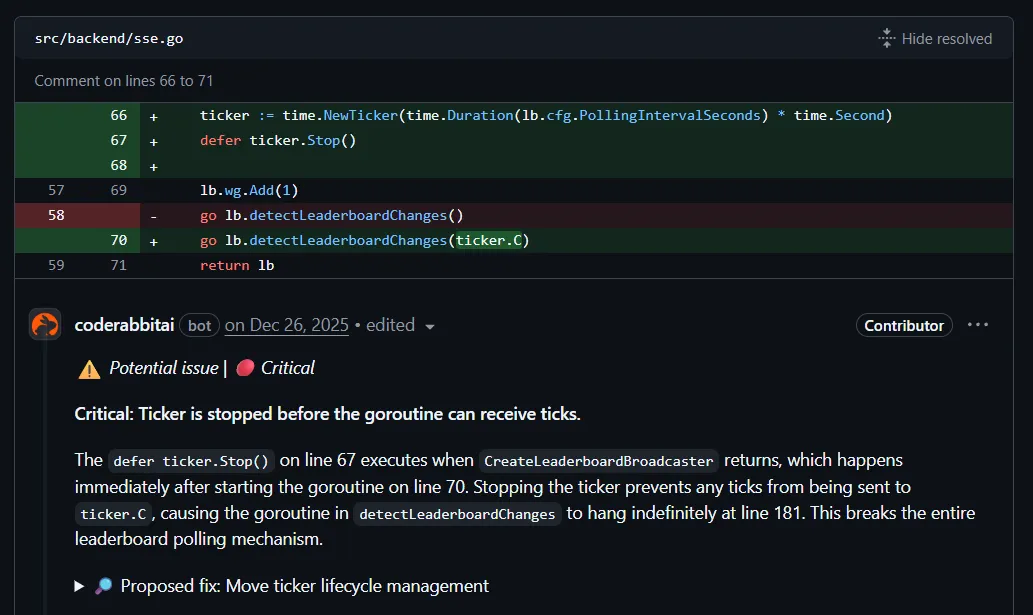
This is one area I haven’t explored much, though it looks promising. The signal-to-noise ratio requires careful filtering, but when it works, it catches issues that I don’t notice quickly.
I’ve got good results in the few times I’ve used it recently, for example this concurrency bug it found on my leaderboard project, or this issue with tickers which I missed out.
This helps especially when you do not have a huge depth of knowledge in the tech you’re working with, and if its mature (like Go) automated code reviews can figure out deeper issues like these.
Reducing repetitive work
Low stakes work where you know what needs to be done and is something that’s pretty common - initial Dockerfiles, CI, frontend (I don’t know any frontend), spinning up POCs for understanding integrations.
In fact all the design changes I’ve done to this blog that make it different from the default astro-paper blog are implemented by AI. These are quite simple modifications, but would take me a long time to learn and do myself.
Pair programming
I use this mostly to learn while doing, where I do not ask for implementations (I like to think of it as the LLM prompting you, the user).
I’ve used this to refactor tightly coupled code, add tests to a project that started off without any, working through unfamiliar frameworks or languages (Wes McKinney talks about this).
What I don’t use it for
Architecture decisions, complex or sensitive logic, questions about the product (these should be done by humans, and well documented for the AI to assist with implementation).
I’m against doing this with AI, considering the limitations I’ve seen agents have while doing these sorts of tasks, and having to redo everything from scratch is not pleasant. It’s better to ask another person if you don’t know what you’re doing and got stuck with these.
I’ve learned these boundaries through experience with what goes wrong when AI handles these tasks:
- Hallucinated APIs during integrations, even when pointed to correct documentation, AI sometimes invents methods or parameters that don’t exist, especially for newer or less common libraries
- Adding unnecessary abstractions or functions that will never be called
- Generating verbose code with defensive checks (multiple error checks) that obscure the actual logic
Having to review and redo everything from scratch negates any speed benefits - there’s no point being fast if you’re wrong.
Tests
A lot of people (especially on twitter) say that AI is really good at writing tests, which is something I’ve never experienced. Every time I’ve used AI to write tests ends up badly, with it focusing on pointless details and missing the point. There’s one instance where I tried to make it generate a Property Based test for a simple function, in order to learn more about it without having to read a long article. I got some unit tests that were not PBT at all.
Workflow
Before implementation
- Identify the correct thing to work on
- Break it down into chunks, write about the components, how they need to be built, design preferences, everything (just do it in a coherent way, add indexes and summaries to prevent the agent from getting lost)
- Start with questions to identify gaps
Implementation
- Iterate fast - agents implement, developers review, write and run tests (faster feedback cycles)
- Update and expand on spec as you go (to ensure we stay on track)
- Ask questions where something is done in a weird way (can be a good learning experience)
Post implementation
- Run tests to see if changes violate expected behaviour
- if something breaks, it’s often better to hand it to another model if the initial one isn’t able to figure it out (I prefer Claude)
Tools I use
I currently use GitHub Copilot (free through my student account) integrated with VSCode, and Claude and Gemini web interface for more complex tasks requiring careful context management.
I’ve experimented with other tools - Cursor early after launch had significant hallucination issues that pushed me toward the web chat approach. I’m planning to try Cline and Windsurf next, and have heard promising things about Claude Code though I haven’t used it yet due to the costs.
Context and the web chat hack
I do use coding agents integrated with an IDE (Copilot with VSCode, that’s the only one I have right now). These did have a terrible experience for me until very recently, and frequently gave me grossly incorrect code and I’d have to redo from scratch (which is why I prefer spec driven development rather than one off prompts whenever using integrated agents).
I found a hack that works a lot of times to bypass this limitation of one off prompts (it’s all about context).
I believe that coding agents are sometimes terrible at choosing the correct context even when you tell them explicitly which ones to use (you’d have noticed them reading multiple unrelated files to do a change).
Instead I copy parts of the code that I know are relevant, create a prompt that explains exactly what I want to do, any design rules that I want it to conform to etc. and paste it to Claude or another web based chat platform, which has worked well for a lot of tasks that integrated coding agents would have bloated the context for.
The human part
I strongly believe that there’s no replacing humans in software engineering, and the best way to make use of this tech is as a tool to multiply output.
However output is not impact, therefore humans are required to find out where things should be going, and will be valued for their taste and judgement going forward. Humans should be in the loop (especially for any and all code that goes to production), and by using humans + AI we’ll be able to achieve a lot more (multiples, not incremental changes) compared to before.
So, is this a good thing?
Yes.
Personally, apart from all the things I’ve mentioned before, it allows for iterating on a lot more ideas than before. A lot of my blogs contain scripts that have been generated by AI, iterated upon, then refined by hand to remove the fluff and have the exact things needed. I’m also using it to assist in writing the code for upcoming sidequests on TTL and durable execution.
I’d love to not think about the syntax too much when building things, and get more of my ideas out there in the world. I really enjoy the process of building things, and the syntax significantly slows things down, so any improvement to that is helpful as it helps me get things done while the idea is still fresh in my mind.
On the other hand I also like to implement things by hand to learn - scaling, performance improvement, memory are some of the things I would prefer to do without any AI assistance.
I do like to discuss difficult learning topics with gemini though, and make it critique the design of my systems (something I’m not very good at) in a way that keeps it from being sycophantic about it. This is one limitation of LLMs that if overcome can help improve things a lot, getting critique for your ideas anytime, use the knowledge the LLM was trained on to spot flaws early.
What about prod?
Production code should still be thoroughly reviewed, and any generated code should be generated on the basis of specific details, not vibes. There’s also automated testing, but tests aren’t enough alone, and understanding of the generated code and prior codebase is essential for using these tools where code affects live software.
Other blogs I liked on this topic
- https://iximiuz.com/en/posts/grounded-take-on-agentic-coding/
- https://simonwillison.net/2025/Mar/11/using-llms-for-code/
- https://addyosmani.com/blog/ai-coding-workflow/
- https://github.blog/ai-and-ml/generative-ai/spec-driven-development-with-ai-get-started-with-a-new-open-source-toolkit/
- https://antirez.com/news/158
- https://antirez.com/news/155
- https://antirez.com/news/154
- https://antirez.com/news/153